
Ok, I've been racking my brain trying to figure this out, working on the latest zenphoto 1.5.6. php 7.3.8 on MAMP. The last bug to get ironed out before going live.
On a plain vanilla unmodified version of the zenpage theme (this also happens on other custom and default themes, but wanted to eliminate any variables), here's the issue:
Using the menu–manager plugin (which is brilliant), whenever I am in a zenpage news category the first item in the menu-manager menu becomes inactive (no href is printed, it's an empty LI with just text).
I've experimented with this a bit, no matter what the menu item is (page, news, link, gallery, album), it's always the first menu item which is inactive and link-less. It's only when I am in a zenpage news category page, everywhere else it's completely normal!
Any ideas what the issue could be? I'm totally stumped!

Please provide more info about how you setup your menu.
There is a default menu created that uses some predefined setup (you see that if the menu entries are named "menufunction"). Do you use that or a complete custom menu? If the latter what exactly is the first menu entry in the menu?
A menu entry element will be linkless generally if you are on the item itself as there is no point of linking to itself. So far I am currently not able to reproduce this behaviour using the Zenpage theme besides this expected behaviour.
Complete custom menu, I just tried creating a brand new menu (separate from the default) 'zenpage' menu), and calling that in the zenpage sidebar.php file. I'm still getting the same behavior (screenshots below).
Exactly as you said, the entry is linkless just as if it were the active URL, and the HTML includes the 'menu-active' class tag. However when the URL is /news/category/xxx/ the first link is always inactive, no matter what it points to.
If the 'contact' zenpage page is first in the menu, it becomes inactive. If the 'art' album link is the first item, then it's the one to become inactive. Same for any menu item first in the menu-manager list.
[Image: https://i.ibb.co/wQWJm40/Screen-Shot-201...-28-PM.png]
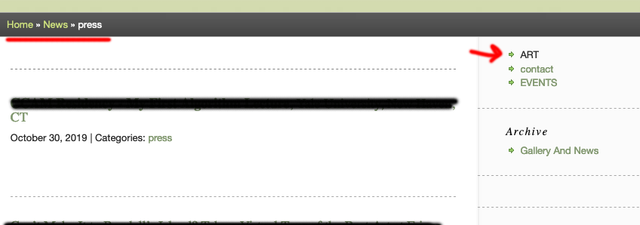
[Image: https://i.ibb.co/88BdPRk/Screen-Shot-201...-34-PM.png]
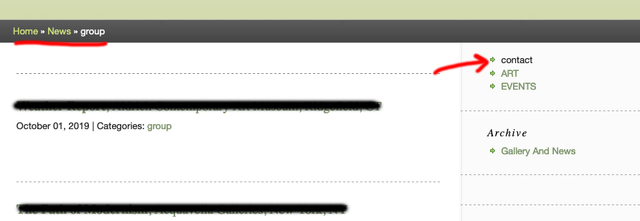
I decided to try to replicate this on a fresh zenphoto install in case there was a corrupt database field somewhere in my old DB. I just used the softalicious zenphoto demo running the latest version here
Managed to get the exact same behavior as my local install, so it's not the DB or theme. To clarify how I got the result:
- activate menu_manager plugin
- activate zenpage plugin and switch to zenpage theme
- in theme options for zenpage check 'use custom menu'
- clear out the default zenpage menu completely and create a few new menu items
- I did one for zenpagenewsindex, galleryindex, a zenpagepage
- create a few news articles and news categories, assign categories to articles.
- go into the news index page, then click on one of the news categories.
Here the bug happens, the first menu item in the custom menu becomes inactive, regardless of what it points to, always the first one in the list.

Has there been a resolution to this issue? I am experiencing same problem. I however have 4 categories of new. and the top menu item does not link to /news/ for all categories.
Also, I think that there is a problem with the links in the breadcrumb when browsing news categories.
This topic is two years old, so I would think that there would have been a fix.
As far as we could reproduce as mentioned above this has been fixed meanwhile as noted: https://www.zenphoto.org/news/zenphoto-1.5.7/
The fix aims as individual category links in the menu, not if you use a function menu item to generate them.
Btw, the topic is one year old ;-)
Also, I think that there is a problem with the links in the breadcrumb when browsing news categories.
Please open another topic for this with details what you think is wrong and a link to your site at best.